🔌 Integrating OpenAI into Your React App (How We Did It at Spillmetrics)

I am a software developer, passionate about technology and community building! with high interest in expertly prepared noodles by myself
If you're building any product that relies on user input, data, or decision-making—chances are, AI can dramatically enhance the experience. At Spillmetrics, our journaling and AI analytics platform for traders, we use OpenAI to transform historical trade data into clear, actionable, and tailored trading recommendations—like a mentor baked into the dashboard.
In this article, I’ll walk you through how to integrate OpenAI into your own React app. I’ll show code samples, outline best practices, and offer practical use-case ideas you can adopt (without giving away every trade secret from our startup).
Whether you're building SaaS, productivity tools, dev platforms, or finance apps, this will help you get started with OpenAI integration the right way.
🧾 Why Integrate OpenAI into React?
Let’s start with why. AI models like GPT-4 and GPT-3.5-turbo are not just conversational tools. They’re pattern recognizers and transformers: you give them structure, they return insights. When combined with clean frontend architecture, they become a way to deeply personalise user experiences without manually writing logic for every edge case.
Here are just a few benefits of integrating OpenAI into your React frontend:
Reduce cognitive load for your users. Instead of dumping raw data, summarise and suggest.
Encourage action. AI-generated insights help users make better decisions faster.
Scale human-like support. Use AI as an assistant, reviewer, or mentor at scale.
Introduce novel features. AI adds a layer of magic and intelligence that feels futuristic, even when it’s practical.
At Spillmetrics, our traders upload and track their trade logs. We send that structured history to OpenAI, and in return, we deliver insights like:
What strategy is working?
What pattern keeps hurting their trades?
What should they test or backtest next?
These insights are data-driven, brief, and human-like, but scalable without requiring a human mentor behind every profile.
🛠️ Setting Up: What You Need
To use OpenAI in any application, you need an account and a few pieces of setup. Here's the checklist:
Create an OpenAI account → https://platform.openai.com/signup
Grab your API key from your API keys dashboard
Enable billing This is required before the API will work, even for testing. You can either
Add a credit card
Use any free trial credits you’re granted (they expire after a set period)
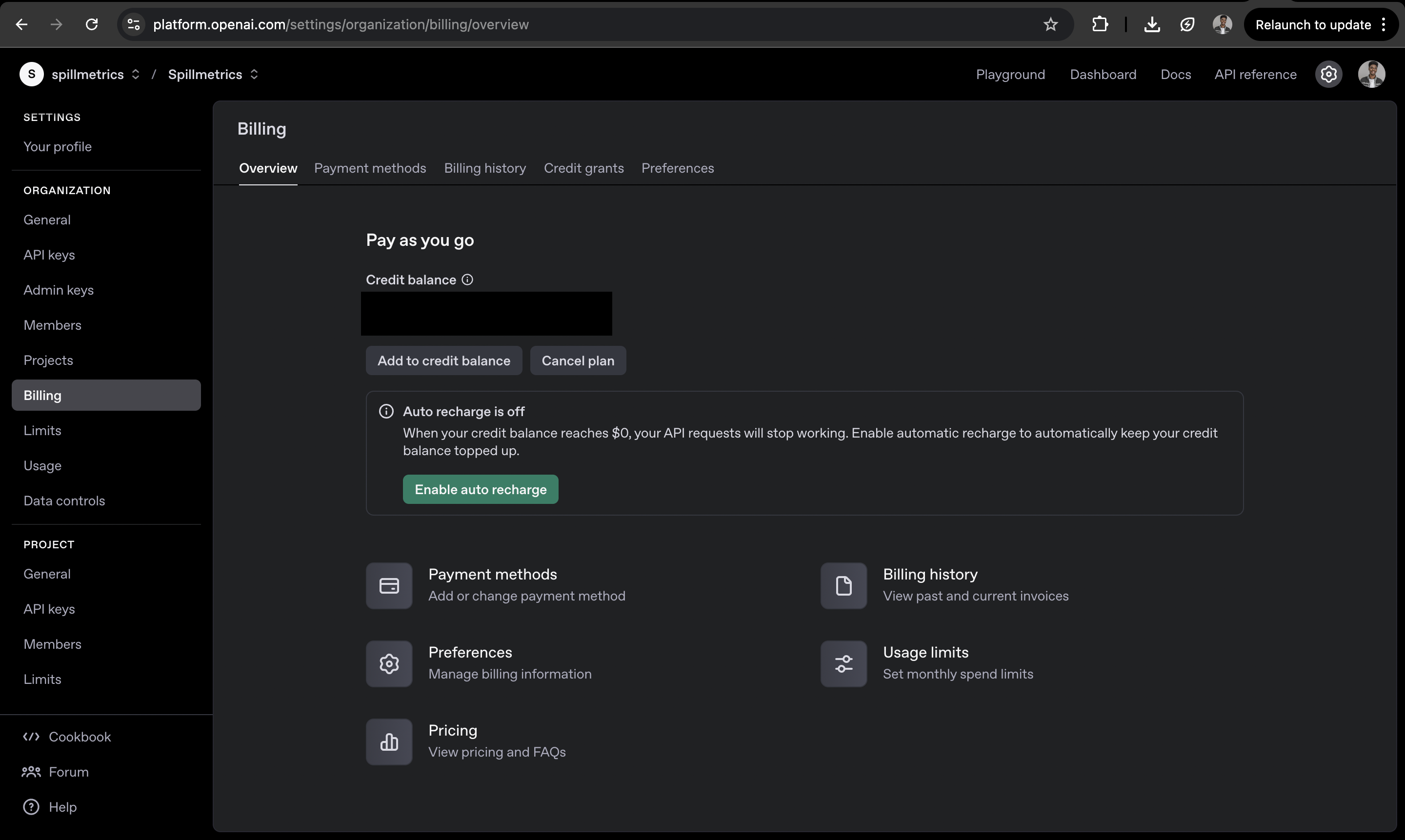
Once done, install the OpenAI SDK in your React project:
npm install openai
If you prefer using REST directly, you can also skip the SDK and use fetch or axios, but the SDK makes things easier, especially for managing headers and structure.
OpenAI Setup in React (Safe but Effective)
React runs on the client side, and that introduces one major consideration: security. Exposing your OpenAI API key to the browser is unsafe.
Still, for prototyping or authenticated apps, you can work directly in React. Create a file called openaiClient.js. Here’s a stripped-down but functional setup:
// openaiClient.js
import OpenAI from "openai";

const openai = new OpenAI({
  apiKey: process.env.REACT_APP_OPENAI_API_KEY, // Must be in .env for security
  dangerouslyAllowBrowser: true, // Don’t use this in production
});

export default openai;
To use this:
Add your key in
.env:REACT_APP_OPENAI_API_KEY=your-key-hereMake sure you never commit
.envfiles to GitHub, even privately.
🛡️ For production, always route API requests through a backend server or serverless function. Firebase Functions, Next.js API routes, or a Node.js/Express backend will all work.
🤖 The AI Recommendation Function
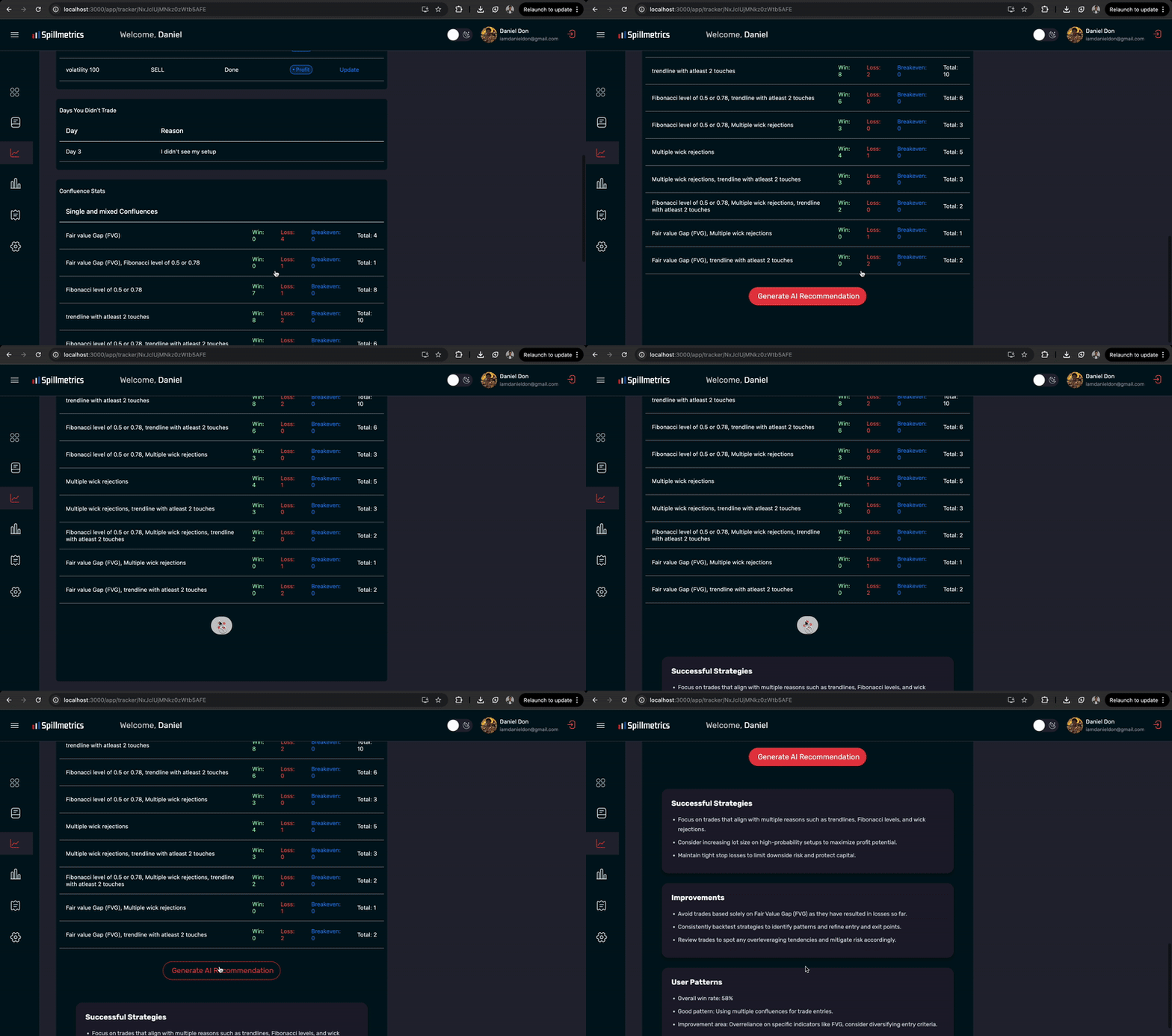
In Spillmetrics, we use OpenAI to analyse each trader's performance. Here's how we do it (trimmed and anonymised for this article):
import openai from "./openaiClient";

export const getAiTradingRecommendations = async (tradeData) => {
  const prompt = `
    Based on the following trading data, provide specific, detailed, but concise
    recommendations. Avoid vagueness. Use only the data.

    Data:
    ${JSON.stringify(tradeData, null, 2)}

    Return JSON like:
    [
      ...
    ]
  `;

  try {
    const response = await openai.chat.completions.create({
      model: "gpt-3.5-turbo",
      messages: [
        { role: "system", content: "You are a professional trading coach." },
        { role: "user", content: prompt },
      ],
      max_tokens: 600,
    });

    return response?.choices?.[0]?.message?.content || "No insights available.";
  } catch (error) {
    console.error("OpenAI error:", error);
    return "Could not fetch AI insights.";
  }
};
You’d call it like this:
const insights = await getAiTradingRecommendations(filteredTrades);
This returns a structured JSON array of categorised recommendations, which you can map over in your React UI using cards, list groups, or styled divs.
The Secret Ingredient: Prompt Engineering
AI integration is easy. Getting good output is the challenge. That’s where prompt engineering matters.
Tips I’ve learnt:
Scope it hard: Tell GPT exactly what to do, what format to return, and what tone to use.
Use real structure: JSON, markdown, and YAML; these help GPT organise its thoughts.
Limit the task: Don’t ask it to do five things at once.
Frame its role: “You are a trading mentor” performs differently from “You are an AI assistant.”
Practical Use Cases You Can Build Right Now
I used ChatGPT to generate some interesting ideas you can explore. Here are some hands-on ideas to use OpenAI to build:
| Use Case | Description |
| Personal Health Coach | Input sleep, nutrition, and fitness data; get back wellness tips. |
| Smart Resume Reviewer | Feed in resume text, receive categorised feedback, and score. |
| Bug Triage Bot | Let users submit bug reports and get summarised dev-focused feedback. |
| Daily Writing Assistant | Turn bullet-pointed thoughts into refined journal entries. |
| Learning Companion | Paste a study note or class transcript, and get summaries or flashcards. |
| Custom Onboarding Helper | Ask new users questions and return customised startup guides. |
These can all be MVPs in under a week if you already have frontend and form handling in place.
Security & Billing: What You Must Know
Security Tips:
Never expose API keys in production.
Use server functions to route requests securely.
Validate inputs before sending to OpenAI (no PII, no large files).
Monitor rate limits and prevent abuse.
Billing Notes:
Each OpenAI call costs tokens (not dollars).
gpt-3.5-turbois ~10x cheaper than GPT-4.You can set
max_tokensto control cost per call.Track usage here: https://platform.openai.com/usage
In Spillmetrics, we default to GPT-3.5-turbo to maintain speed and cost-efficiency. And we cap each response at around 600 tokens to avoid bloated, generic replies.
Bonus: Debugging the Output
When testing your function:
Use
console.log(JSON.stringify(response, null, 2))Use Postman or Hoppscotch to test the raw OpenAI REST API
Validate that your frontend parser can handle the JSON returned. Data would usually be returned in markdown, so you might need to parse the markdown to get to the JSON object within.
If GPT occasionally breaks JSON formatting, wrap it in a try/catch and sanitize
You may also consider tools like:
zodoryupto validate schemasCustom fallback UI when OpenAI fails or returns unusable data
Here is what the end result on spillmetrics looks like:
Conclusion
Integrating OpenAI into your React app isn’t just about following hype. It’s about giving your users an intelligent layer that adds value, whether through feedback, analysis, summaries, or conversation.
In Spillmetrics, this meant creating a seamless bridge between raw trade data and personalised feedback. That same architecture could work in your SaaS tool, learning platform, dashboard, or even your portfolio.
The best part? Once your prompt is dialled in and the integration is clean, the output feels magical—like your app suddenly “knows” the user better.
Call to Action:
Want to take it further? Try integrating OpenAI into a developer tool or financial dashboard. If you do, tag me; I’d definitely love to see how you shape your prompts and design your UX around the responses.


